
Your WhatsApp Business description is 256 characters (512 on the API) that decide whether someone who lands on your profile taps the message button or backs out. Most businesses either leave it blank or put in something like "Quality products, great service", which tells nobody anything and makes nobody want to buy.
This goes through what a description needs to do, 15 examples across industries you can adapt, the mistakes that lose customers, and how to set it up on the app and the API.
What it is
Your elevator pitch compressed into 256 characters, or 512 if you're on the WhatsApp Business API through a solution provider. It sits at the top of your business profile - when someone taps your business name they see name, category, address, hours, website, and this line - and it's often the first thing they read before deciding to message you.
In that space it has to do three things: tell people what you do, show them why you over the next option, and give them a reason to act now. The character limit feels restrictive, but it forces you to drop the fluff and keep only what matters to the customer.
Why it matters
A complete, well-written profile gets noticeably more engagement than a vague or empty one, because the description is a small conversion tool working around the clock.
First impressions are fast. On WhatsApp you have a few seconds before someone decides if your business looks trustworthy and relevant, and a clear line is the difference between a new chat and a missed one. It builds trust - imagine you're searching for a bakery that delivers, and profile A says "Bakery services available" while profile B says "Fresh artisan bread & pastries daily | Free delivery on orders ₹500+ | Order now for same-day delivery". You trust the second one, because it tells you what they sell, what you get, and what to do next.
It also helps people find you. WhatsApp has search, so keywords in your description matter. If you're a plumber in Mumbai and the description says "emergency plumbing Mumbai 24/7", you're far more likely to show up for that exact search. It sets expectations, so serious buyers know your main products, response times, offers or delivery details before they reach out. And it's a sample of your brand voice - a bold tech startup and a calm wellness coach should sound different here, and when the description matches your website, Instagram and Google Business listing, people recognise you.
What goes in a good one
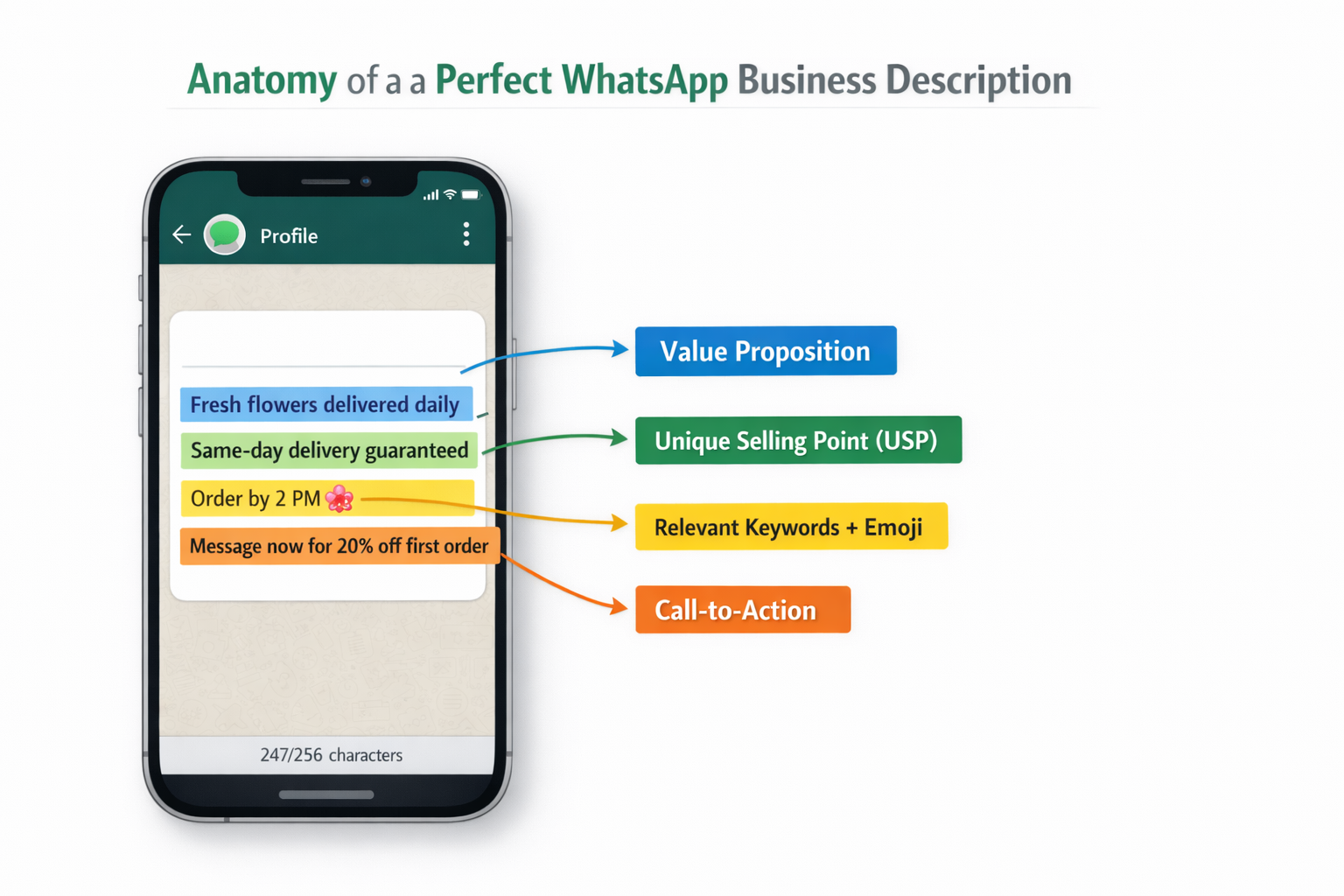
The best descriptions combine five things in a natural way.
A clear value proposition. Say what you do and who for, in the words your customers use, no jargon. Not "Innovative solutions provider in the digital space". "Web design & SEO for small businesses". People shouldn't have to guess.
Your unique selling point. What makes you different - faster delivery, better pricing, specific expertise, handmade, a guarantee. "24/7 emergency service", "Handcrafted by local artisans", "Same-day delivery guaranteed", "Free 30-min consultation". Even one strong USP lifts interest a lot.
A call to action. Don't assume people know what to do next. "Contact us for more info" is weak. "Message now for today's special offer!" is specific and gives a reason.
Relevant keywords. The words a customer would type looking for a business like yours - industry, service type, sometimes location. For a fitness trainer, "personal training", "weight loss", "fitness coach". Weave them in so the line still reads like a sentence, not a list of tags.
Emojis, sparingly. One or two relevant ones help readability and break up the text. A string of them looks messy. "Fresh flowers delivered daily | Order by 2 PM for same-day delivery" works. An emoji after every phrase doesn't.
15 examples by industry
Each one balances clarity, a value proposition and a call to action inside the limit.
E-commerce and retail:
- Fashion: "Trendy fashion for modern women | New arrivals weekly | Free delivery on orders ₹999+ | DM for your size & style"
- Electronics: "Genuine electronics & accessories | Authorized dealer | Same-day delivery available | Best prices guaranteed | Message for quotes"
- Handmade: "Handcrafted gifts & home decor | Customization available | Supporting local artisans | Eco-friendly products"
Food and beverage:
- Restaurants: "Authentic Italian cuisine | Fresh ingredients daily | Home delivery & takeaway | Order now for hot meals | Open 11 AM - 11 PM"
- Healthy food: "Healthy meal prep delivered | Nutritionist-approved menus | Weekly subscriptions available | WhatsApp to customize your plan"
Health and wellness:
- Fitness: "Personal training that gets results | Online & in-person sessions | Custom meal plans included | Book your FREE consultation now"
- Beauty and spa: "Luxury spa treatments at affordable prices | Expert therapists | Organic products only | Book your appointment today"
Professional services:
- Consulting: "Business coaching for startups & SMEs | 10+ years experience | Free initial consultation | Message now to grow your revenue"
- Marketing: "Social media marketing that converts | Content + Ads + Strategy | Free audit for new clients | Let's grow your brand"
Education:
- Coaching: "IELTS coaching with 95% success rate | Small batch sizes | Flexible timings | Free demo class register now"
Real estate:
- Property services: "Your trusted property advisor in Mumbai | Residential & commercial | No hidden fees | Message us your requirements"
Home services:
- Cleaning: "Professional home cleaning | Eco-friendly products | Background-verified staff | Same-day service available"
- Repairs: "24/7 emergency plumbing services | Licensed & insured | Same-day repairs | Call or WhatsApp for immediate help"
Automotive:
- Car services: "Certified car repair & maintenance | Doorstep service available | Free pickup & drop | WhatsApp your car issues for quote"
And a general template to plug your own details into: "[Service Name] | [Key Benefit] | [Special Offer/USP] | [Clear CTA]"
Mistakes that cost you customers
Being too vague. "We sell quality products" fails because everyone claims quality and it says nothing about what you sell, who for, or why you. "Handmade leather bags & wallets | Lifetime warranty | Free personalization" works.
Emoji overload. Scattered emojis feel noisy, less professional, harder to scan. "Unique gift shop | Personalized items for every occasion | Same-day delivery available" is enough.
No call to action. "Professional photography services in Delhi since 2010" is informative and passive, the reader doesn't know what to do. "Professional photography in Delhi | 10+ years experience | Book your session DM now" tells them.
Jargon. "Leveraging synergistic solutions for enterprise-level digital transformation initiatives" means nothing to most people. If your grandmother wouldn't get it, it's too complex. "We help businesses grow online with websites, SEO & digital marketing" is clear.
No USP. "Coffee shop with great coffee and food" could be any café. "Specialty coffee roasted in-house daily | Vegan pastries | Free WiFi | Perfect workspace for freelancers" stands out.
Forgetting keywords. "We help you look your best for your special day" won't show up for "bridal makeup artist Mumbai". "Professional bridal makeup artist Mumbai | HD makeup | Home service available | Book your trial session" will.
One reminder: WhatsApp has guidelines on business content. Nothing misleading, threatening, or hyped without substance. Keep it honest and focused on helping the customer.
Setting it
On the WhatsApp Business app:
- Open the app.
- Tap the three dots, top right.
- Select "Business tools".
- Choose "Business profile".
- Tap "Description".
- Write or paste it (up to 256 characters).
- Tap "Save".
On the API, through a platform like AiSensy, Wati or another solution provider, you manage the profile from their dashboard instead. Similar steps, and you usually get an extended limit (often 512 characters), analytics on profile views and engagement, integration with automated messaging and chatbots, and multi-user access.
Once it's set, ask a friend or colleague to look at the profile with fresh eyes. Does it make sense immediately? Do they feel like messaging? We're all too close to our own business to spot confusing wording.
Getting more out of it
Update it. It doesn't have to be permanent - change it for seasons, launches, campaigns. Summer: "Fresh mango deliveries | Farm-fresh fruit | Order now for today's harvest". Winter: "Hot soup & comfort food delivery | Warm up with our seasonal menu | Order now". Even a non-seasonal business benefits from a refresh every few months.
Test versions. Try different CTAs ("Message now" vs "Book today" vs "Get your free quote"), lead with price versus speed versus quality, emojis versus none, shorter versus slightly longer. Track message volume and quality after each change.
Match your other profiles, so the WhatsApp line feels like the same brand as your Instagram bio, Google Business profile and website.
Add urgency, honestly. "Limited slots available for March", "Flash sale ends midnight", "Free delivery this weekend only", "Book before month-end & save 20%". Never fake scarcity.
Write for a phone. Short, scannable, the "|" symbol to separate ideas, no dense sentences.
Lead with your strongest benefit. If 24/7 support is your edge, it goes first. Certified or award-winning, near the start, not the end.
Hint at social proof. "Trusted by 5000+ customers", "4.9★ rated on Google", "Award-winning service", "Certified by...". Small signals that reassure quickly.
Use local language where it fits. "Delivery across Mumbai & Navi Mumbai", "Quick delivery in HSR Layout & Koramangala".
Combine CTAs when there's room. "Browse catalog, message for custom orders, or call for bulk pricing!" gives people more than one way in.
Take ten minutes today and rewrite yours against the checklist - what you do, what's different, what to do next. Then move on to the messages themselves: how WhatsApp templates work covers what gets approved and what doesn't.
Common questions
What's the character limit?
256 characters on the WhatsApp Business app. On the API via platforms like AiSensy or Wati, up to 512 for the description field. Spend them on your core value, key offers and a clear call to action.
Can I include links or phone numbers?
You can type them but they won't be clickable in the description field. WhatsApp gives you dedicated profile fields for website, phone number and address, so use the description to persuade people to message or tap those.
How often should I update it?
Review it at least once a quarter, and update whenever you launch products, run seasonal promotions, change hours or shift positioning.
Should I use emojis?
If they fit your brand, and sparingly. One to three relevant ones make it friendlier and easier to scan. Too many, or unrelated ones, look unprofessional.
Can I write it in multiple languages?
WhatsApp doesn't translate descriptions, so pick the language that matches your main audience. In a multilingual market you can mix in a few key terms from a second language, within the limit.
What do I prioritise if I'm out of characters?
In this order: what you do, your USP, a call to action. Cut filler, use "24/7" instead of "24 hours a day", and "&" where it still reads clearly.
How do I make it more searchable?
Natural keywords for your industry, location, specialisation and unique features - "vegan bakery", "plumber Mumbai", "emergency AC repair 24/7" - fitted into a sentence that still reads well.
What's the difference between a good and a great description?
A good one explains what you do. A great one makes people want to act immediately. The difference is specificity, benefit-focused wording, a clear CTA, and a tone that sounds like a person.
Can I see analytics on it?
The standard app doesn't show stats for profile views or description performance. Many API platforms offer profile views, engagement and message response rates, so you can gauge impact indirectly.
Read more

How Ecommerce Brands Sell Through ChatGPT and Claude
AI assistants like ChatGPT and Claude are becoming how people find and buy products. How an e-commerce brand gets its catalog inside those platforms, what MCP is, and what it takes to close a sale in the conversation itself.

WhatsApp for Ecommerce: How to Drive Sales and Cut Support Load
Most ecommerce brands use WhatsApp as a broadcast channel and nothing else. How to use it properly, from the Business API and chatbots to the four automation flows worth setting up first, and what it costs.

Stop Writing WhatsApp Templates by Hand and Start Using AI
What a WhatsApp template generator using AI does, why templates get rejected, how to pick the right category, where the generator falls short, and how to get a WhatsApp bot running without a big spend.