
If you've been scrolling through your Instagram DMs and noticed little text bubbles sitting above your conversations, that's Instagram Notes, and it's one of the most underrated features on the platform.
Notes is a short-text status feature, up to 60 characters, shared directly inside the Direct Messages inbox. No photos or videos needed, just text, quick and casual. Along with broadcast channels, it's one of the two Instagram features that skip the feed completely.
What makes Notes different is placement. They appear at the very top of your followers' DM screen, the first thing people see when they open their messages. No algorithm to fight, no hoping someone scrolls far enough. Your note is just sitting there.
Notes disappear after 24 hours (72 hours when attached to posts or Reels), which keeps them fresh and creates the kind of urgency that gets people to act now. There are four types: a text update, an interactive question followers can respond to, a location tag, or a music note sharing what you're listening to.
For a business, that top-of-inbox spot is the whole point. Most brand content competes in a crowded feed. Notes sidestep the competition entirely.
What makes a note work
Sixty characters sounds impossibly short, and that's the point. Writing a good one is its own discipline.
It gets straight to it. Every word earns its place. "Flash sale today only 30% off everything" does the job, a rambling announcement doesn't even fit.
It creates curiosity or urgency. Notes that tease something ("Something big drops Friday 👀") or set a deadline ("Last 10 spots - DM us!") consistently outperform generic announcements.
It invites a reply. Notes that ask a question or prompt an action start direct conversations, and every reply opens a one-on-one DM thread.
It sounds like a person. "New collection just dropped 🔥" feels right in that space. A corporate-sounding announcement feels wrong.
The best ones read like a text from a friend who happens to run a good business.
Posting one
Under a minute:
- Open Instagram and tap the paper airplane or speech bubble icon, top right, to open DMs.
- Find the Notes section at the top of your inbox, a row of profile pictures from people you follow.
- Tap your own profile picture to open the note creation screen.
- Type your message (60-character limit). Tap the music icon to share what you're listening to, or use @ to mention someone.
- Choose your audience - "Followers you follow back" for the widest reach, or "Close Friends" for a curated group.
- Tap "Share". It goes live immediately at the top of your followers' DM screen.
To update or delete it, tap your profile picture again in the Notes tray. And post during peak hours, check Instagram Insights for when your followers are most active.
Four ways businesses use them
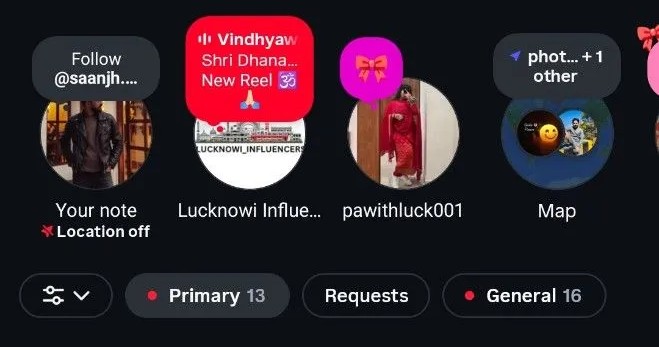
Flash announcements and time-sensitive offers. Notes are built for urgency, they vanish in 24 hours and sit at the top of the inbox, so they suit limited-time deals, same-day sales and last-minute availability. When someone opens their DMs, your "20% off today only code SAVE20" is the first thing they see, with zero ad spend. Things like:
- "Flash sale ends midnight - 40% off all items!"
- "Only 5 spots left for today's workshop - DM us!"
- "Free shipping until 11:59 PM. Don't miss it."
Quick business updates. A low-effort way to keep followers informed without a full post or Story. Changed hours, back in stock, a new line launching. It reads like a friend giving you a heads-up rather than a formal announcement:
- "We're back open after the holidays 🎉"
- "New menu drops this Friday - stay tuned!"
- "Website's back up sorry for the wait!"
Feedback and conversations. Every reply opens a private DM, which is a real chance to build a relationship with one customer. Use Notes to ask questions or test interest before launching something:
- "Which color should we restock black or cream?"
- "What's one thing you'd love us to add to our menu?"
- "Rate our new packaging 1 to 5?"
The casual format lowers the barrier to answer. It's quick and low-pressure, which is exactly why people reply.
Community and a human face. Not every note has to sell. Some of the most effective ones make followers feel part of something - a behind-the-scenes glimpse, a relatable observation, a milestone:
- "5 years in business today thank you 🙏"
- "Just finished a big shoot. Can't wait to share it."
- "Mondays hit different with good coffee ☕"
Ideas by business type
All inside the 60-character limit.
E-commerce and retail:
- "New drop just landed shop before it sells out!"
- "Weekend sale: 25% off sitewide. Code: WEEKEND"
- "Restock alert your fave is back 🛒"
Restaurants and cafes:
- "Today's special: truffle pasta. DM to reserve!"
- "Happy hour starts at 4 see you soon?"
- "New seasonal menu is live come try it!"
Service businesses and consultants:
- "2 client slots open this week - DM to book"
- "Free 15-min call today only limited spots!"
Coaches and creators:
- "New video just dropped go watch it now!"
- "What topic should I cover next? DM me!"
Real estate and local business:
- "New listing just posted swipe to see it!"
- "Open house this Saturday all welcome"
The pattern is the same across all of them: specific, a reason to exist today, and an easy next step.
Measuring whether they work
Instagram doesn't have a dedicated analytics dashboard for Notes yet, but you can still tell.
Watch DM replies. Every reply is a conversation started. A note generating 15-20+ replies is clearly landing. Watch overall DM activity after posting, a jump is a good sign. Track likes, Notes don't show view counts but you can see who liked one by tapping it, a rough benchmark for reach. And use unique discount codes, if a note promotes a sale, tie a specific code to it so you know what it drove.
The lack of formal analytics pushes you toward conversation quality over vanity numbers. A note that starts 10 real conversations is worth more than a post that gets 500 likes and no replies.
Getting more out of them
Time them. Notes last 24 hours, so post when your audience is around. For most accounts that's mid-morning or early evening on weekdays.
Be consistent. Three to four a week is a good rhythm, and followers start looking out for them.
Use emojis on purpose. One relevant emoji adds personality, a stack of them just eats characters.
Coordinate with your other content. New Reel at 6PM, teaser note at 5PM. Limited offer in Stories, reinforce it with a note. Notes work best as part of a layered plan, not on their own.
Reply to every reply, quickly and personally. It's one of the easiest ways to build loyalty on Instagram and most businesses skip it.
Use Close Friends for VIP content. Exclusive deals or early access to a curated list feel premium, and that exclusivity builds loyalty.
Post one today at the hour your Insights say people are around, and reply to whoever answers.
Common questions
What's the character limit?
60 characters, including spaces and emojis.
How long do Notes last?
24 hours in the DM inbox. 72 hours when posted on Reels or feed posts.
Who can see my Notes?
Either followers you follow back, or your Close Friends list, your choice for each note.
Can businesses use Notes?
Yes. They work on both personal and business accounts, and they're a low-effort tool for updates, offers and starting conversations.
Can I see who viewed my Note?
No view count, but you can see who liked it by tapping on it.
What happens when someone replies?
It opens a Direct Message conversation between you and that follower, which is the most useful thing a note can produce.
Why can't I see Notes on my account?
Update the app to the latest version. Notes may also be limited in some regions.
Read more

How to Create an Instagram Broadcast Channel for Business
How to set up an Instagram broadcast channel for a business account, what to post, how to get followers to join, and why most brand channels go quiet after three posts.

Agentic Commerce: How AI Agents Buy and Sell
AI agents are already browsing, comparing and buying on behalf of shoppers. What agentic commerce actually means, how an agent shops, and what your store has to fix before an agent comes looking.

Best AEO Platforms for Ecommerce Brands in 2026
A comparison of the AEO tools ecommerce teams are buying in 2026, what each one does, where each falls short, and how to pick one without losing a quarter to the wrong vendor.