
These two terms get used interchangeably on almost every WhatsApp platform's marketing page. "Automate your WhatsApp with AI-powered chatbots." "Build chatbots and automation flows." It all blurs together fast.
The problem is they're genuinely different things, and building the wrong one first is a common reason teams end up with a setup that half-works. A business that needs automation builds a chatbot and wonders why order updates are still manual. A business that needs a chatbot sets up broadcast sequences and wonders why the support queue isn't shrinking.
If you're at the stage of comparing platforms, Top 3 AiSensy Alternatives covers which ones are worth evaluating. This post is the step before that, what each thing is, where they overlap & which one your operation needs right now.
What WhatsApp automation is
Automation is triggering actions based on events. Something happens in your system and WhatsApp sends a message or runs a workflow in response, with nobody watching and no conversation open.
A customer places an order, your ecommerce platform fires a webhook, WhatsApp sends a confirmation. A contact hasn't engaged in 90 days, the CRM flags them, a re-engagement template goes out. Someone fills a lead form on your site and gets a WhatsApp message a few minutes later asking if they want to book a call. All three are automation, & in none of them did the customer have to say anything.
That's the defining characteristic: automation is outbound and trigger-based. It runs in the background, connected to your other tools, doing predefined things when conditions are met.
In practice it covers:
- Order confirmations, dispatch alerts, delivery notifications
- Appointment reminders and follow-up sequences
- Payment reminders and renewal nudges
- Lead nurture drip sequences
- Post-purchase feedback requests
- Re-engagement campaigns to dormant contacts
- Internal alerts when a conversation needs attention
Most of these don't involve a conversation at all. Messages go out, get read, maybe get a reply, but the job is notification or triggered outreach, not dialogue.
What a WhatsApp chatbot is
A chatbot handles incoming conversations. Someone messages your number and the bot responds, guides, qualifies or resolves, without a human in the loop.
The difference from automation is that a chatbot is reactive and conversational. It listens, interprets what someone said, and decides what to say next. That decision logic is what makes it a chatbot and not just an auto-reply.
A basic chatbot runs on decision trees. Someone says "pricing", the bot shows pricing. Someone says "support", the bot shows support options. It's a menu, simple to build, predictable, and it works well for defined scenarios. An AI-powered chatbot uses natural language processing to handle freeform messages - someone types "I ordered two days ago and haven't heard anything", the bot understands the intent, pulls the order status from your backend and replies with the tracking. That's closer to what people mean by "AI chatbot".
In practice a chatbot covers:
- Answering FAQs without agent involvement
- Guiding new contacts through a qualification flow
- Handling support queries (order status, returns, policy questions)
- Booking appointments through a conversational interface
- Collecting information before routing to a human agent
- Running surveys or feedback collection inside a conversation
The chatbot's job is inbound volume. Every conversation it resolves is one that doesn't hit your team's queue.
Where they overlap
This is where it gets genuinely blurry, and why most platforms describe both under the same umbrella.
Take a cart recovery flow. A customer abandons their cart, an automation sends a WhatsApp message with the cart contents and a checkout link. The customer replies "do you have this in blue?" Now a chatbot has to handle that reply, by answering from product data, routing to a human, or collecting the query for follow-up. The automation fired the first message, the chatbot handled the reply, neither one alone completes the job.
Or lead qualification. A click-to-WhatsApp ad brings someone in, a chatbot asks three qualification questions, and based on the answers an automation tags the contact in your CRM, assigns them to a sales rep, and schedules a follow-up message for 24 hours later.
In most production setups both run together in the same platform. Automation handles the outbound triggers, the chatbot handles the inbound responses. Distinct in function, tied together in execution. Fufa AI's flow builder does both in the same interface, which matters because splitting them across tools creates sync problems fast.
The real distinction: who starts the conversation
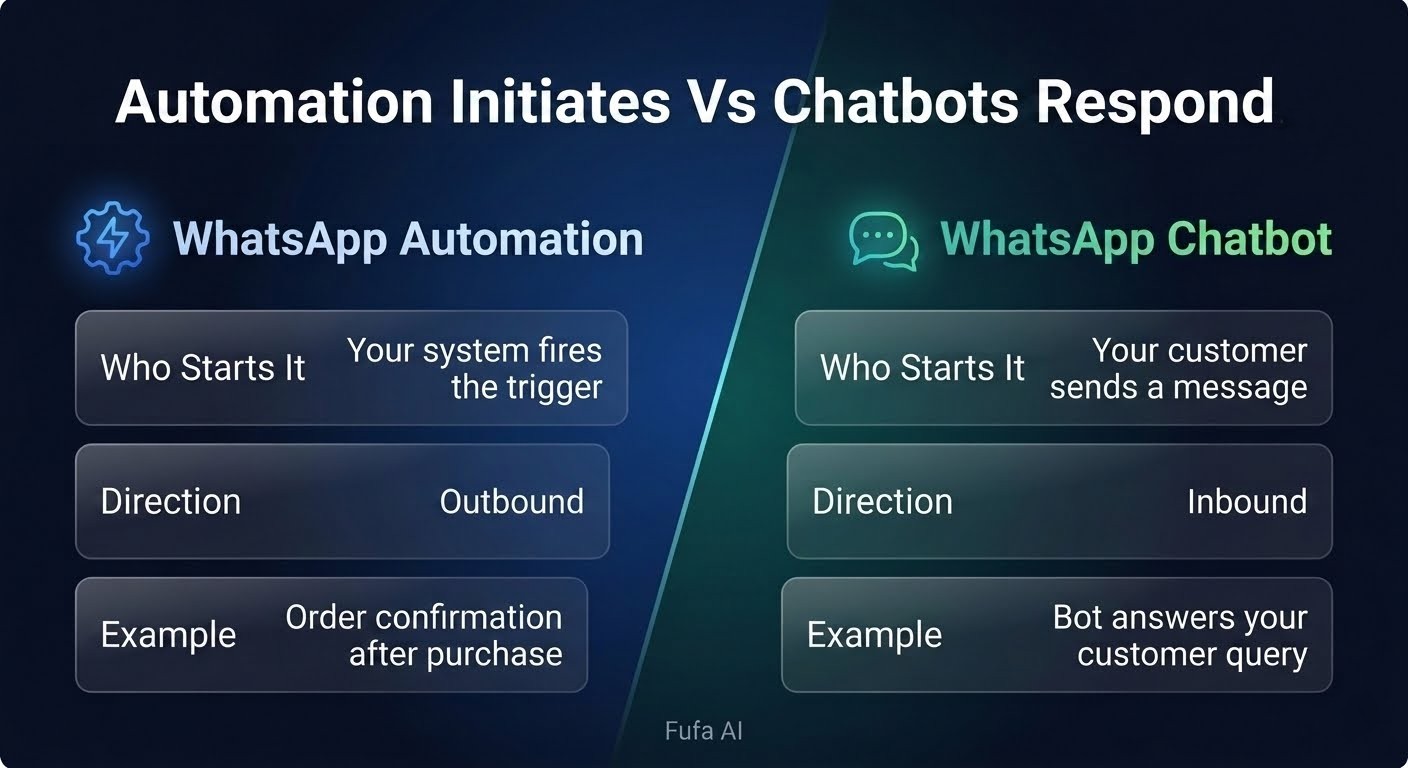
Strip everything else away and the line is this. Automation initiates. Chatbots respond.
Automation reaches out based on what happened somewhere in your stack. Chatbots engage with what a customer sends you. That framing helps when you're deciding what to build first, because the question isn't "automation or chatbot", it's where the actual problem is.
- If your team is spending hours manually sending order updates, reminders or follow-ups, you need automation.
- If your inbox is full of repetitive inbound questions your team answers the same way every time, you need a chatbot.
- If both are true, you need both, but they have different build priorities.
What to build first
The most common mistake is treating this as either/or and picking the more interesting-sounding one. Chatbots feel more tangible - they have dialogue, personality, a structure you can see. Automation feels like plumbing.
But if your team is manually sending order confirmations, reminders and follow-ups every day, the plumbing is where you'll feel relief first. Don't build a chatbot to answer "where's my order?" when automation connected to your order system would stop the question being asked at all. Work backwards from where your team's time is actually going.
Start with automation if:
- You have high outbound volume that's done manually today (confirmations, reminders, follow-ups)
- Your support team answers the same status questions repeatedly because customers aren't proactively informed
- You're running WhatsApp campaigns without any triggered sequences tied to customer behaviour
- Your CRM has customer data that isn't being used to personalise or time messages
Start with a chatbot if:
- Your inbound WhatsApp volume is high and most queries are variations of the same questions
- You have a sales qualification step that a human currently does by asking the same screening questions
- You're running click-to-WhatsApp ads and dropping leads into a human inbox with no structured first response
- Customers ask questions outside business hours and get nothing till the next morning
Build both when you've mapped your full customer journey on WhatsApp and can see distinct outbound trigger points (automation) and inbound conversation scenarios (chatbot) that are both costing you time or customers. Most businesses that are serious about WhatsApp get here eventually. The sequence matters more than the timing.
A note on "AI chatbot" claims
Every platform selling WhatsApp tools now calls its product an "AI chatbot". Worth being specific about what that means before you buy.
A decision-tree bot with keyword matching is not an AI chatbot. It's a menu. Works fine for many uses, but it fails on anything slightly outside its defined paths and customers notice fast. A genuine AI chatbot uses a language model to interpret freeform messages, handle variations in phrasing and generate contextually appropriate responses, and it needs proper training data, ongoing review, and clear escalation paths for when the model gets it wrong.
For most small and mid-size businesses, a well-built decision-tree bot handles a large share of inbound queries reliably. The rest either escalate to a human or get better over time as you refine the flow. Jumping straight to AI without that foundation usually gets you a bot that sounds impressive in a demo and confuses customers in production.
Our default recommendation on Fufa AI is: start with structured flows, measure what breaks, and layer in AI response handling for the categories where structured flows consistently fail. That produces a bot that works over time instead of one that needs constant firefighting.
How Fufa AI handles both
Fufa AI treats automation and chatbot logic as parts of the same workflow rather than separate products. You can build a flow that starts with an automated trigger, passes into a chatbot conversation, tags the contact based on responses, and then fires another automated message downstream, all in the same builder. Template management, approval tracking, CRM sync and human handoff are part of the same setup instead of stitched together from different tools.
If you want to see how this maps to your current setup, book a call with our team and we'll walk through where automation ends and chatbot logic begins for your use case.
Automation and chatbots aren't competing options. They're different tools with different jobs, and most businesses eventually need both. Needing both doesn't mean building both at once, though. Start where your biggest operational drain is - drowning in repetitive inbound queries, build the chatbot; team manually sending messages a system should be sending, build the automation. Get one working well before layering on the other. The platforms that promise to do everything out of the box rarely set either one up correctly without someone thinking through the logic first.
Questions we get asked
What's the main difference between WhatsApp automation and a WhatsApp chatbot?
Automation triggers messages based on events in your system, a purchase, a cart abandonment, a time-based condition. It's outbound and doesn't need a customer to initiate anything. A chatbot handles incoming messages, responding conversationally to queries, qualifying leads or resolving support requests. Both use the WhatsApp Business API, but they serve opposite directions of communication.
Can I use WhatsApp automation without a chatbot?
Yes. Plenty of businesses run automation-only: order confirmations, reminders, re-engagement sequences, no conversational bot. When customers reply, the replies land in a shared inbox for human agents. Works fine if your inbound volume is manageable or replies to automated messages are rare.
Do I need the WhatsApp Business API for both?
Yes. Both need the API. The free WhatsApp Business app has greeting and away messages, which are very basic auto-replies, but neither counts as automation in the operational sense and there's no chatbot capability at all. Any serious implementation of either needs API access through a Business Solution Provider.
What's the risk of building a chatbot before setting up automation?
You end up with a bot that answers "where's my order?" all day because you never connected your order data to proactively update customers. The chatbot becomes a workaround for a problem automation would have prevented. Build automation for your transactional touchpoints first, then build the chatbot for what's left.
How do I know if a platform's "AI chatbot" is actually AI?
Ask specifically whether it uses natural language processing to interpret freeform messages, or whether it relies on keyword matching and predefined menus. Ask what happens when a customer types something outside the defined paths. A real AI chatbot handles variation and ambiguity. A keyword bot returns a fallback message or fails silently. The demo usually gives it away.
How long does automation take to set up versus a chatbot?
Basic automation, order confirmations, reminders, can go live fairly quickly once your templates are approved and your backend has webhook or API connectivity. A chatbot takes longer because you need to map conversation flows, write dialogue, test edge cases and iterate. A minimal chatbot covering your most common inbound query types takes real time to do properly, usually longer than teams expect.
Can the same platform handle both?
It should. Running them on separate platforms creates sync issues, fragmented contact data and gaps in conversation history. When a customer gets an automated message and replies with a question, the chatbot needs to know what was sent. That context only exists cleanly if both live in the same system.
When should a chatbot always hand off to a human?
Any time a customer expresses frustration, asks for a manager, or has a query that's an exception to standard policy. Also when the bot has given two responses that didn't resolve the issue. The handoff should be immediate and the agent should see the full conversation history. Customers should never have to repeat themselves after a bot-to-human transition.
Read more

Top WhatsApp Automation Tools for Customer Support in the UAE
Compare WhatsApp automation UAE tools for customer support and see how Meta's per-reply billing from October 2026 changes what running a bot costs.

Top 3 AiSensy Alternatives Worth Switching To in 2026
AiSensy does one thing well. If you need more channels in one inbox, AI that can hold a conversation, or better pricing at volume, these are the three alternatives worth looking at, and who each one is for.

Top 3 Wati Alternatives in 2026 and Which One Fits Your Team
The three Wati alternatives worth evaluating in 2026, AiSensy, Interakt and Fufa.ai. What each one costs, where each falls short, and which root problem each one solves.